> For the complete documentation index, see [llms.txt](https://koyodraw.gitbook.io/drawtab/llms.txt). Markdown versions of documentation pages are available by appending `.md` to page URLs; this page is available as [Markdown](https://koyodraw.gitbook.io/drawtab/ergonomics/ergonomics-of-pen-displays.md).

# Ergonomics of Pen Displays

### Why Ergonomics Matters

Using a pen display for long hours can cause discomfort if the setup isn’t optimized. Poor posture, awkward angles, and extended reach all contribute to strain in the wrist, elbow, shoulder, and back. A well‑designed ergonomic setup ensures comfort, reduces fatigue, and supports healthier long‑term use.

<div data-with-frame="true"><figure><img src="https://100795559-files.gitbook.io/~/files/v0/b/gitbook-x-prod.appspot.com/o/spaces%2FFTDevk6pVgbzRnLdmWfX%2Fuploads%2F4PLuRyAe3CiUzPpj4K3f%2Fimage.png?alt=media&amp;token=a667323c-6557-4c9b-97c5-9792d31938ad" alt=""><figcaption><p>Sae Otani, a fulltime animation artist from Studio Trigger</p></figcaption></figure></div>

### Display Positioning

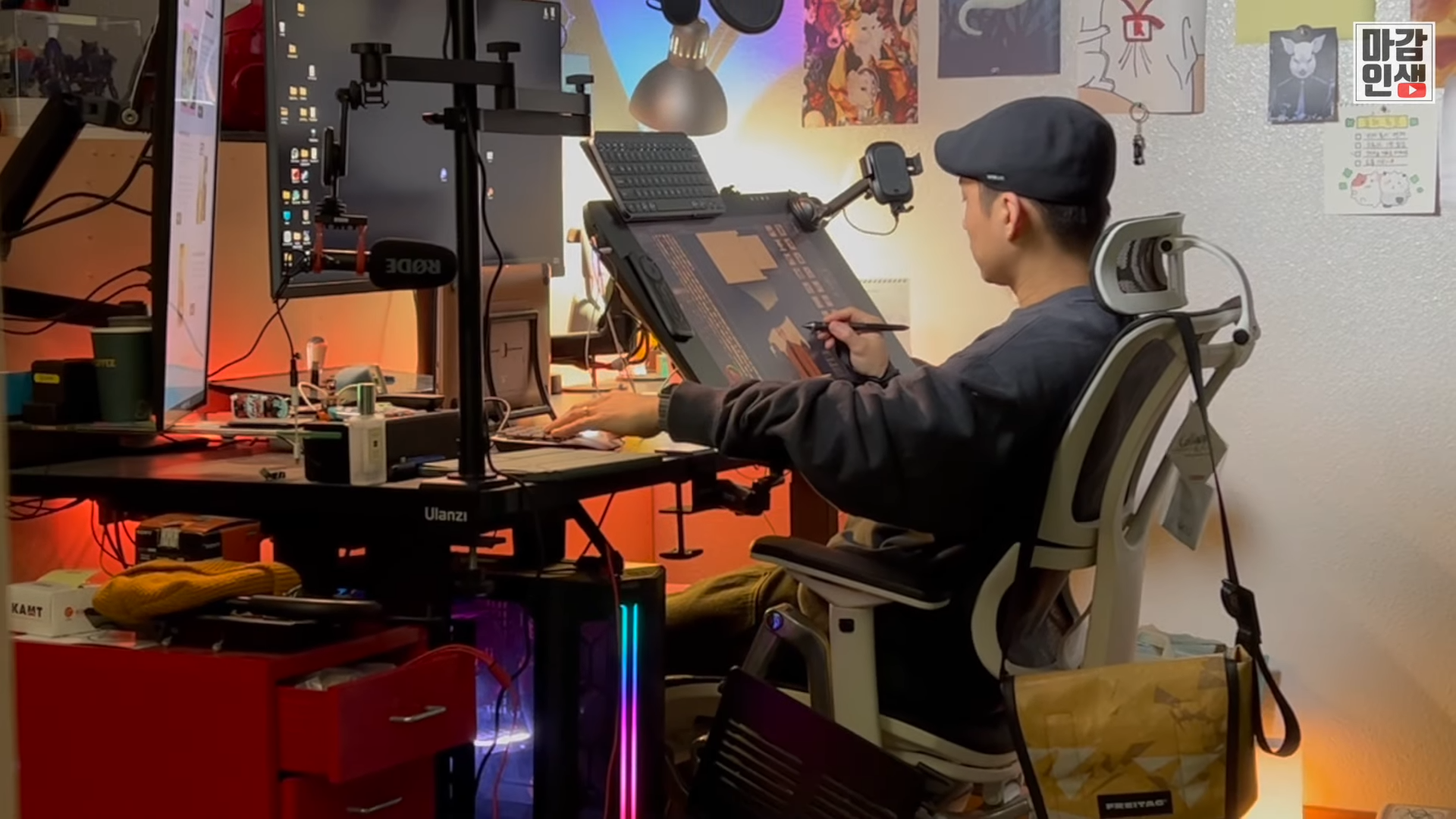
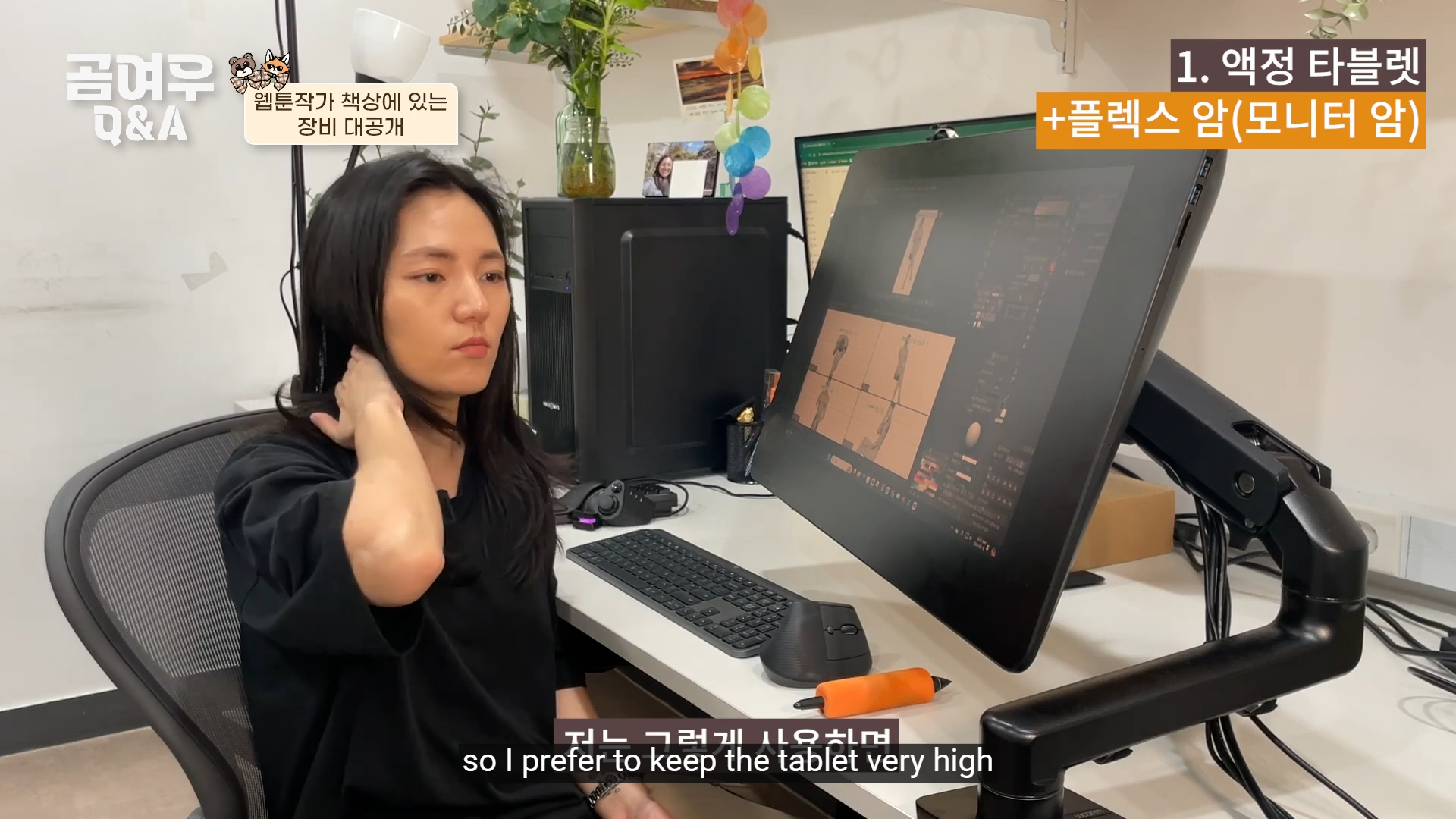
* **Higher angle, not flat**: A pen display should be tilted upward rather than lying flat on the desk. This reduces wrist bending and keeps the canvas closer to eye level.
* **Adjustable stands or art tables**: Tools like drafting tables or adjustable stands allow you to fine‑tune the angle for your body posture.
* **Avoid low angles on large displays**: Bigger screens at shallow angles force the arm to extend farther, increasing strain.

<div data-with-frame="true"><figure><img src="https://100795559-files.gitbook.io/~/files/v0/b/gitbook-x-prod.appspot.com/o/spaces%2FFTDevk6pVgbzRnLdmWfX%2Fuploads%2FwR4iIq3Ub7x4rxO5s8Dg%2F7mzFFEe_jZU%2000-10-00%20putting%20Kim%20Song's%20interview%20on%20Muvink%20-%20The%20author%20is%20a%20bit%20like%20me.png?alt=media&amp;token=e8ae6232-7129-4a19-a2dd-69f496df3939" alt=""><figcaption><p>Source: <a href="https://youtu.be/7mzFFEe_jZU?si=9O-O0_zBSMaW4AyW&#x26;t=600">https://youtu.be/7mzFFEe_jZU?si=9O-O0_zBSMaW4AyW&#x26;t=600</a></p></figcaption></figure></div>

### Arm and Elbow Comfort

* **Closer reach**: Keep the display close enough so your arm doesn’t stretch outward for long periods.
* **Bent elbow at \~90°**: This position balances comfort and control, minimizing pressure on the joint.
* **Avoid extreme angles**: Over‑bending or locking the elbow can lead to tension and fatigue.

{% columns fullWidth="false" %}
{% column width="50%" %}

<div data-with-frame="true"><figure><img src="https://100795559-files.gitbook.io/~/files/v0/b/gitbook-x-prod.appspot.com/o/spaces%2FFTDevk6pVgbzRnLdmWfX%2Fuploads%2Fcymy2gTxu7MtXUpGJm3S%2FEASbvJNQz0U%2000-00-39%20James%20Baxter%20on%20Weight%20and%20Balance.png?alt=media&amp;token=b63b38ee-bbc7-40b0-94cd-6d492ab0e10d" alt=""><figcaption><p>James Baxter (Animator) with a Cintiq 22HD<br>(Source: <a href="https://www.youtube.com/watch?v=EASbvJNQz0U&#x26;list=PLbBzE3sdXXa_EYoAGKsFOoS90zJBnoBvm&#x26;index=4">https://www.youtube.com/watch?v=EASbvJNQz0U</a>)</p></figcaption></figure></div>
{% endcolumn %}

{% column width="50%" %}

<div data-with-frame="true"><figure><img src="https://100795559-files.gitbook.io/~/files/v0/b/gitbook-x-prod.appspot.com/o/spaces%2FFTDevk6pVgbzRnLdmWfX%2Fuploads%2F5qAkUTMdysOTHesYrNtQ%2Fimage.png?alt=media&amp;token=11d9a658-8e35-47f7-ba76-5b73c03741f7" alt=""><figcaption><p>James Baxter with a traditional desk for animators.</p></figcaption></figure></div>
{% endcolumn %}
{% endcolumns %}

{% embed url="<https://www.youtube.com/watch?v=CRmxP6NYSzQ>" %}

### Body Posture

* **Neutral spine**: Sit upright or reclined slightly, avoiding hunching forward.
* **Chair support**: Use a chair with good back support to reduce strain during long sessions.
* **Relaxed shoulders**: Keep shoulders low and relaxed to prevent stiffness.

{% columns fullWidth="false" %}
{% column width="50%" %}

<div data-with-frame="true"><figure><img src="https://100795559-files.gitbook.io/~/files/v0/b/gitbook-x-prod.appspot.com/o/spaces%2FFTDevk6pVgbzRnLdmWfX%2Fuploads%2FEir9wb58wQNXhc0WUGD6%2Fimage.png?alt=media&amp;token=73f704d5-c983-48c9-b4ef-62b04424a307" alt=""><figcaption><p>Pen display is better at eye levels, and having a proper back support.</p></figcaption></figure></div>
{% endcolumn %}

{% column width="50%" %}

<div data-with-frame="true"><figure><img src="https://100795559-files.gitbook.io/~/files/v0/b/gitbook-x-prod.appspot.com/o/spaces%2FFTDevk6pVgbzRnLdmWfX%2Fuploads%2FH9upkVU6wTvSWjCiFLNx%2Fimage.png?alt=media&amp;token=28db0014-441d-411f-b3b5-2151ddd12726" alt=""><figcaption><p>Posture tips from Marc Brunet.<br>Source: <a href="https://x.com/ytartschool/status/2016204885046526022">ytartschool </a>on twitter</p></figcaption></figure></div>

{% endcolumn %}
{% endcolumns %}

### **Prevent Shoulder and Back Pain**

* Keep the canvas at eye level to reduce leaning.
* Adjust chair and desk height so your arms rest naturally.
* Shift positions regularly to avoid stiffness.

<figure><img src="https://100795559-files.gitbook.io/~/files/v0/b/gitbook-x-prod.appspot.com/o/spaces%2FFTDevk6pVgbzRnLdmWfX%2Fuploads%2FlDoYoU1aaG3KbNe6lDsD%2FgUEj8sS_P5Y%2000-00-04%20Wacom%20Movink%20Pad%20Pro!%20Enjoy%20the%20Cintiq%20writing%20experience%20outdoors_.png?alt=media&amp;token=317de33e-494a-4723-bd2e-f3a5bbe17122" alt=""><figcaption><p>Another setup example from a Korean webtoon artist.<br>(Source: <a href="https://www.youtube.com/watch?v=gUEj8sS_P5Y">https://www.youtube.com/watch?v=gUEj8sS_P5Y</a>)</p></figcaption></figure>

### **Protect Your Wrists**

* Avoid excessive pressure when drawing.
* Keep wrists straight rather than bent at sharp angles.
* Use light strokes and let the pen’s sensitivity do the work.

(For details about protect your wrists and how to hold a pen, there will be page for that.)

<div data-with-frame="true"><figure><img src="https://100795559-files.gitbook.io/~/files/v0/b/gitbook-x-prod.appspot.com/o/spaces%2FFTDevk6pVgbzRnLdmWfX%2Fuploads%2FWDuM0qzCZWe4vH9HcSQv%2Fimage.png?alt=media&amp;token=1c1b8fc1-7943-481f-aba2-5e1215154077" alt=""><figcaption><p>There are many way of using a Pen Display, but not all of them are good for your back and neck.</p></figcaption></figure></div>

### **Take Regular Breaks**

* Every 45–60 minutes, stretch your wrists, arms, shoulders, and back.
* Stand up, walk around, or do quick mobility exercises.
* Short breaks prevent repetitive strain injuries and refresh focus.

#### **Match Tablets to Workflow**

* Small pen displays (under 13") → best for quick sketches or travel.
* Medium pen displays (13–16") → good for short projects.
* Large pen displays (19"+) → ideal for long, detailed work, but require careful ergonomic setup.
* Screenless pen tablet → non drawing tasks, replacing traditional mice.
* Owning multiple tablets can help your workflows more flexible.

#### **Get an Ergonomic Chair**

* It helps support proper posture by aligning the spine naturally.
* Reduces back pain with lumbar support.
* Minimizes neck and shoulder strain through adjustable headrests and armrests.
* Improves blood circulation by keeping feet flat and knees at the right angle.
* Boosts comfort during long sitting sessions.
* Enhances focus and productivity by reducing physical distractions.
* Prevents long-term musculoskeletal issues from poor seating habits.
* Adapts to different body types with adjustable features.

#### More source materials

{% embed url="<https://www.youtube.com/watch?v=MV8ygeLwWT0>" %}
An example of Traditional artists use their drawing board at a high angle.
{% endembed %}

<div><figure><img src="https://100795559-files.gitbook.io/~/files/v0/b/gitbook-x-prod.appspot.com/o/spaces%2FFTDevk6pVgbzRnLdmWfX%2Fuploads%2FVsdi021QF7J1WY4c7MAc%2FBy_5f_aOQAk%2000-03-21%208-Year%20Webtoon%20Artist%E2%80%99s%20Full%20Gear%20Tour%20%F0%9F%92%BB%E2%8F%B0%F0%9F%92%A1%20%5BQ%26A%20Ep.6%5D%20-%20so%20I%20prefer%20to%20keep%20the%20tablet%20very%20high.png?alt=media&amp;token=a13371e1-bbe7-4611-82d8-11d5cc475608" alt=""><figcaption><p>"While some people use it tilted down, I feel that using it that way quickly strains my neck, so I prefer to keep the tablet very high."<br>Source: <a href="https://youtu.be/By_5f_aOQAk?t=187">https://youtu.be/By_5f_aOQAk?t=187</a></p></figcaption></figure> <figure><img src="https://100795559-files.gitbook.io/~/files/v0/b/gitbook-x-prod.appspot.com/o/spaces%2FFTDevk6pVgbzRnLdmWfX%2Fuploads%2FwllmAOKbOmoguuNvd4gI%2Fimage.png?alt=media&amp;token=459d53cc-3f31-4065-8dbc-bc25616b7434" alt=""><figcaption><p>Source: Ch Zi Yan on Facebook</p></figcaption></figure></div>

***