> For the complete documentation index, see [llms.txt](https://koyodraw.gitbook.io/drawtab/llms.txt). Markdown versions of documentation pages are available by appending `.md` to page URLs; this page is available as [Markdown](https://koyodraw.gitbook.io/drawtab/ergonomics/pen-displays-dont-use-it-wrong.md).

# Pen Displays: don't use it wrong!

## Why Ergonomics Matters

Most people don't think about ergonomics until something starts hurting, and then blame their pen display instead of asking why.

Spending hours looking down at a screen and moving your arm across a large surface can slowly lead to wrist, shoulder, neck, or back pain. A good setup won't make you draw better, but it can make long sessions much easier on your body.

Don't assume your setup is fine simply because you've gotten used to it. The body is good at adapting, sometimes to things it shouldn't. If something feels off, it's probably worth paying attention to.

<div data-with-frame="true"><figure><img src="https://100795559-files.gitbook.io/~/files/v0/b/gitbook-x-prod.appspot.com/o/spaces%2FFTDevk6pVgbzRnLdmWfX%2Fuploads%2F4PLuRyAe3CiUzPpj4K3f%2Fimage.png?alt=media&amp;token=a667323c-6557-4c9b-97c5-9792d31938ad" alt=""><figcaption><p>Sae Otani, a fulltime animation artist from Studio Trigger</p></figcaption></figure></div>

### Display Positioning

**One of the most common mistakes is placing a pen display almost flat on the desk.** While it may feel natural at first, it encourages you to bend your wrists and lean forward. Raising the display usually makes a noticeable difference because your hands, arms, and eyes stay in a more comfortable position. Adjustable stands, drafting tables, and monitor arms are all useful because no single angle works for everyone.

Large displays deserve extra attention. The bigger the screen, the more you have to move your arm. If the display sits too low or too far away, that extra reach can become tiring surprisingly quickly.

<div data-with-frame="true"><figure><img src="https://100795559-files.gitbook.io/~/files/v0/b/gitbook-x-prod.appspot.com/o/spaces%2FFTDevk6pVgbzRnLdmWfX%2Fuploads%2FwR4iIq3Ub7x4rxO5s8Dg%2F7mzFFEe_jZU%2000-10-00%20putting%20Kim%20Song's%20interview%20on%20Muvink%20-%20The%20author%20is%20a%20bit%20like%20me.png?alt=media&amp;token=e8ae6232-7129-4a19-a2dd-69f496df3939" alt=""><figcaption><p>Source: <a href="https://youtu.be/7mzFFEe_jZU?si=9O-O0_zBSMaW4AyW&#x26;t=600">https://youtu.be/7mzFFEe_jZU?si=9O-O0_zBSMaW4AyW&#x26;t=600</a></p></figcaption></figure></div>

### Arm and Elbow Comfort

Your drawing arm should never feel like it's constantly reaching for the canvas. If you find yourself stretching forward, move the display closer instead. A relaxed bend at the elbow is generally more comfortable than having the arm nearly straight or tightly folded.

Drawing should come from natural movement, not from holding the arm in awkward positions.

{% columns fullWidth="false" %}
{% column width="50%" %}

<div data-with-frame="true"><figure><img src="https://100795559-files.gitbook.io/~/files/v0/b/gitbook-x-prod.appspot.com/o/spaces%2FFTDevk6pVgbzRnLdmWfX%2Fuploads%2Fcymy2gTxu7MtXUpGJm3S%2FEASbvJNQz0U%2000-00-39%20James%20Baxter%20on%20Weight%20and%20Balance.png?alt=media&amp;token=b63b38ee-bbc7-40b0-94cd-6d492ab0e10d" alt=""><figcaption><p>James Baxter (Animator) with a Cintiq 22HD<br>(Source: <a href="https://www.youtube.com/watch?v=EASbvJNQz0U&#x26;list=PLbBzE3sdXXa_EYoAGKsFOoS90zJBnoBvm&#x26;index=4">https://www.youtube.com/watch?v=EASbvJNQz0U</a>)</p></figcaption></figure></div>
{% endcolumn %}

{% column width="50%" %}

<div data-with-frame="true"><figure><img src="https://100795559-files.gitbook.io/~/files/v0/b/gitbook-x-prod.appspot.com/o/spaces%2FFTDevk6pVgbzRnLdmWfX%2Fuploads%2F5qAkUTMdysOTHesYrNtQ%2Fimage.png?alt=media&amp;token=11d9a658-8e35-47f7-ba76-5b73c03741f7" alt=""><figcaption><p>James Baxter with a traditional desk for animators.</p></figcaption></figure></div>
{% endcolumn %}
{% endcolumns %}

{% embed url="<https://www.youtube.com/watch?v=CRmxP6NYSzQ>" %}

### Body Posture

Good posture is less about sitting perfectly straight, and more about avoiding positions that create tension. Many artists gradually lean closer to the screen without noticing it, especially when working on detailed areas. Over time that habit can put strain on the neck and upper back. Staying relaxed in the chair and keeping the shoulders from creeping upward will usually do more good than trying to maintain a rigid posture.

{% columns fullWidth="false" %}
{% column width="50%" %}

<div data-with-frame="true"><figure><img src="https://100795559-files.gitbook.io/~/files/v0/b/gitbook-x-prod.appspot.com/o/spaces%2FFTDevk6pVgbzRnLdmWfX%2Fuploads%2FEir9wb58wQNXhc0WUGD6%2Fimage.png?alt=media&amp;token=73f704d5-c983-48c9-b4ef-62b04424a307" alt=""><figcaption><p>Pen display is better at eye levels, and having a proper back support.</p></figcaption></figure></div>
{% endcolumn %}

{% column width="50%" %}

<div data-with-frame="true"><figure><img src="https://100795559-files.gitbook.io/~/files/v0/b/gitbook-x-prod.appspot.com/o/spaces%2FFTDevk6pVgbzRnLdmWfX%2Fuploads%2FH9upkVU6wTvSWjCiFLNx%2Fimage.png?alt=media&amp;token=28db0014-441d-411f-b3b5-2151ddd12726" alt=""><figcaption><p>Posture tips from Marc Brunet.<br>Source: <a href="https://x.com/ytartschool/status/2016204885046526022">ytartschool </a>on twitter</p></figcaption></figure></div>

{% endcolumn %}
{% endcolumns %}

### **Prevent Shoulder and Back Pain**

If your shoulders or back feel sore after a drawing session, the display position is often part of the problem. Keeping the screen closer to eye level reduces the urge to hunch forward. A chair that supports your back also helps, but even the best chair cannot compensate for staying in the same position all day.

**Moving around occasionally is just as important as having the right equipment.**

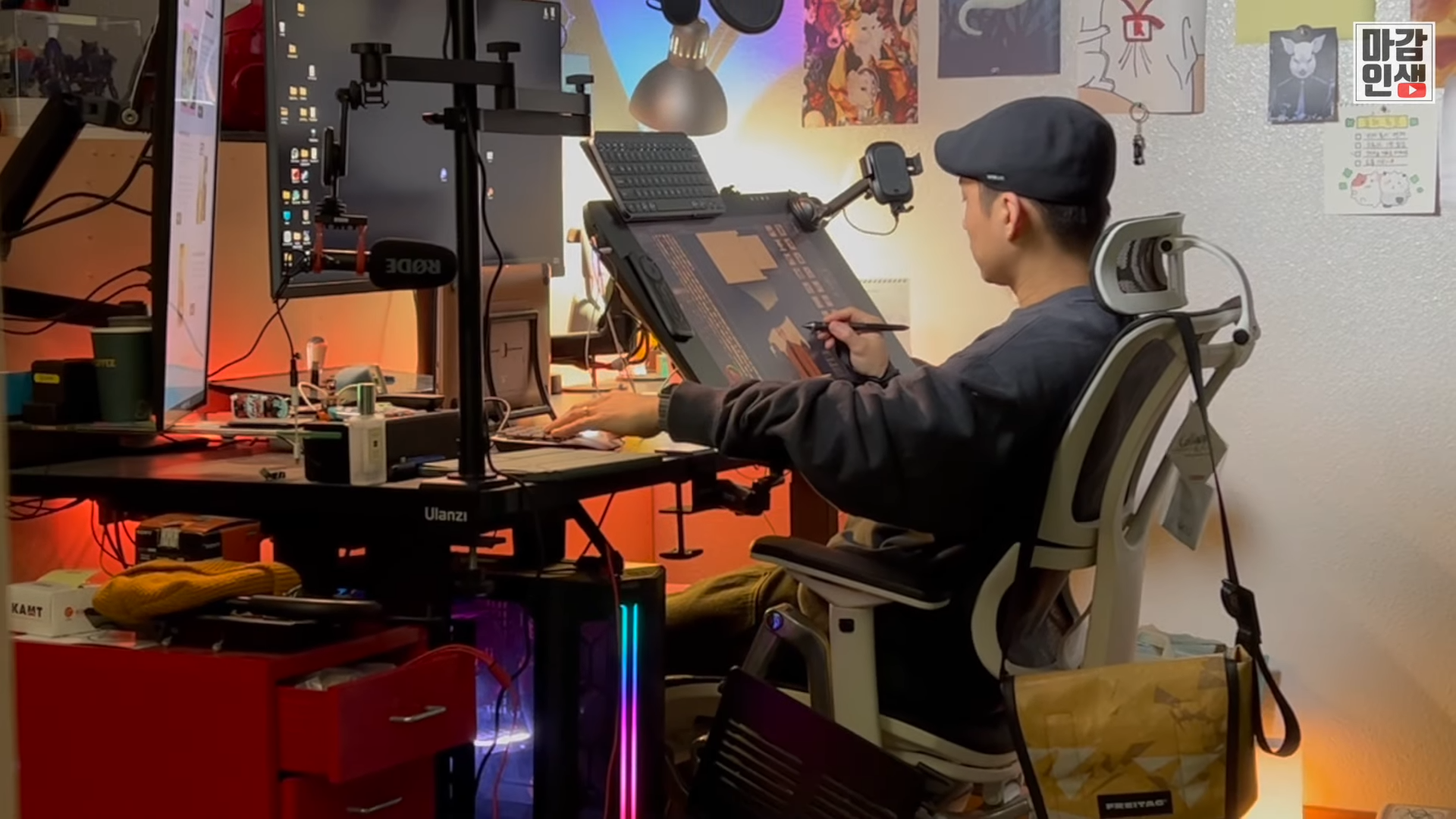
<figure><img src="https://100795559-files.gitbook.io/~/files/v0/b/gitbook-x-prod.appspot.com/o/spaces%2FFTDevk6pVgbzRnLdmWfX%2Fuploads%2FlDoYoU1aaG3KbNe6lDsD%2FgUEj8sS_P5Y%2000-00-04%20Wacom%20Movink%20Pad%20Pro!%20Enjoy%20the%20Cintiq%20writing%20experience%20outdoors_.png?alt=media&amp;token=317de33e-494a-4723-bd2e-f3a5bbe17122" alt=""><figcaption><p>Another setup example from a Korean webtoon artist.<br>(Source: <a href="https://www.youtube.com/watch?v=gUEj8sS_P5Y">https://www.youtube.com/watch?v=gUEj8sS_P5Y</a>)</p></figcaption></figure>

### **Protect Your Wrists**

Many artists press harder than necessary when drawing. Modern pens are sensitive enough that a light touch is usually all that's needed. Keeping the wrist reasonably straight and avoiding extreme angles can make long sessions much more comfortable. If your wrist regularly feels tired after drawing, it's often worth looking at both your drawing angle and how much pressure you're applying.

<div data-with-frame="true"><figure><img src="https://100795559-files.gitbook.io/~/files/v0/b/gitbook-x-prod.appspot.com/o/spaces%2FFTDevk6pVgbzRnLdmWfX%2Fuploads%2FWDuM0qzCZWe4vH9HcSQv%2Fimage.png?alt=media&amp;token=1c1b8fc1-7943-481f-aba2-5e1215154077" alt=""><figcaption><p>There are many way of using a Pen Display, but not all of them are good for your back and neck.</p></figcaption></figure></div>

### **Take Regular Breaks**

There is no ergonomic setup that completely eliminates the need for breaks. Even if everything feels comfortable, your muscles and joints still benefit from movement. Standing up every hour, stretching for a minute or two, or simply walking around the room can help prevent stiffness and keep you feeling fresh during longer sessions.

#### **Match Tablets to Workflow**

The right tablet size depends on how you work:

* Smaller displays are easy to carry around and work well for sketches, notes, and travel.&#x20;
* Medium-sized displays strike a balance between portability and workspace.
* Large displays offer more real estate for detailed artwork, but they also require a more thoughtful setup because of the increased reach.

Screenless tablets still have their place as well. Some artists prefer them for navigation, photo editing, or other non-drawing tasks.

Some artists even use multiple devices, switching between them depending on the task and working environment.

#### **Get an Ergonomic Chair**

A good chair is one of those purchases that feels expensive until you've used it for a few years. Proper support can reduce strain on the lower back, help keep the shoulders relaxed, and make long drawing sessions far more comfortable.

Look for adjustability rather than a specific brand, since the best chair is usually the one that fits your body rather than someone else's.

## Learn from professional artists!

These are tips from professional artists who has years of experience in art industry with long work hours.

{% columns %}
{% column %}

<figure><img src="https://100795559-files.gitbook.io/~/files/v0/b/gitbook-x-prod.appspot.com/o/spaces%2FFTDevk6pVgbzRnLdmWfX%2Fuploads%2FgNEtHgvSiSUIaH757EVa%2Fimage.png?alt=media&amp;token=e794305a-f156-4be1-b735-ced42d90d0f5" alt=""><figcaption><p>Source: @daisdaorie on twitter</p></figcaption></figure>

<figure><img src="https://100795559-files.gitbook.io/~/files/v0/b/gitbook-x-prod.appspot.com/o/spaces%2FFTDevk6pVgbzRnLdmWfX%2Fuploads%2FwllmAOKbOmoguuNvd4gI%2Fimage.png?alt=media&amp;token=459d53cc-3f31-4065-8dbc-bc25616b7434" alt=""><figcaption><p>Source: Ch Zi Yan on Facebook</p></figcaption></figure>

{% endcolumn %}

{% column %}

<figure><img src="https://100795559-files.gitbook.io/~/files/v0/b/gitbook-x-prod.appspot.com/o/spaces%2FFTDevk6pVgbzRnLdmWfX%2Fuploads%2FdNHjasOa795mo5w87m9W%2Fimage.png?alt=media&amp;token=8b890ff0-d0dd-4648-af80-295f24a78c08" alt=""><figcaption><p>Source: @daisdaorie on twitter</p></figcaption></figure>

<figure><img src="https://100795559-files.gitbook.io/~/files/v0/b/gitbook-x-prod.appspot.com/o/spaces%2FFTDevk6pVgbzRnLdmWfX%2Fuploads%2FPtb1kSnTwYQK2jlvgiGe%2Fimage.png?alt=media&amp;token=01d0b80c-c253-4d2c-ab7f-879abe0b59f1" alt=""><figcaption><p>Source: @namu_6ue on twitter</p></figcaption></figure>

{% endcolumn %}
{% endcolumns %}

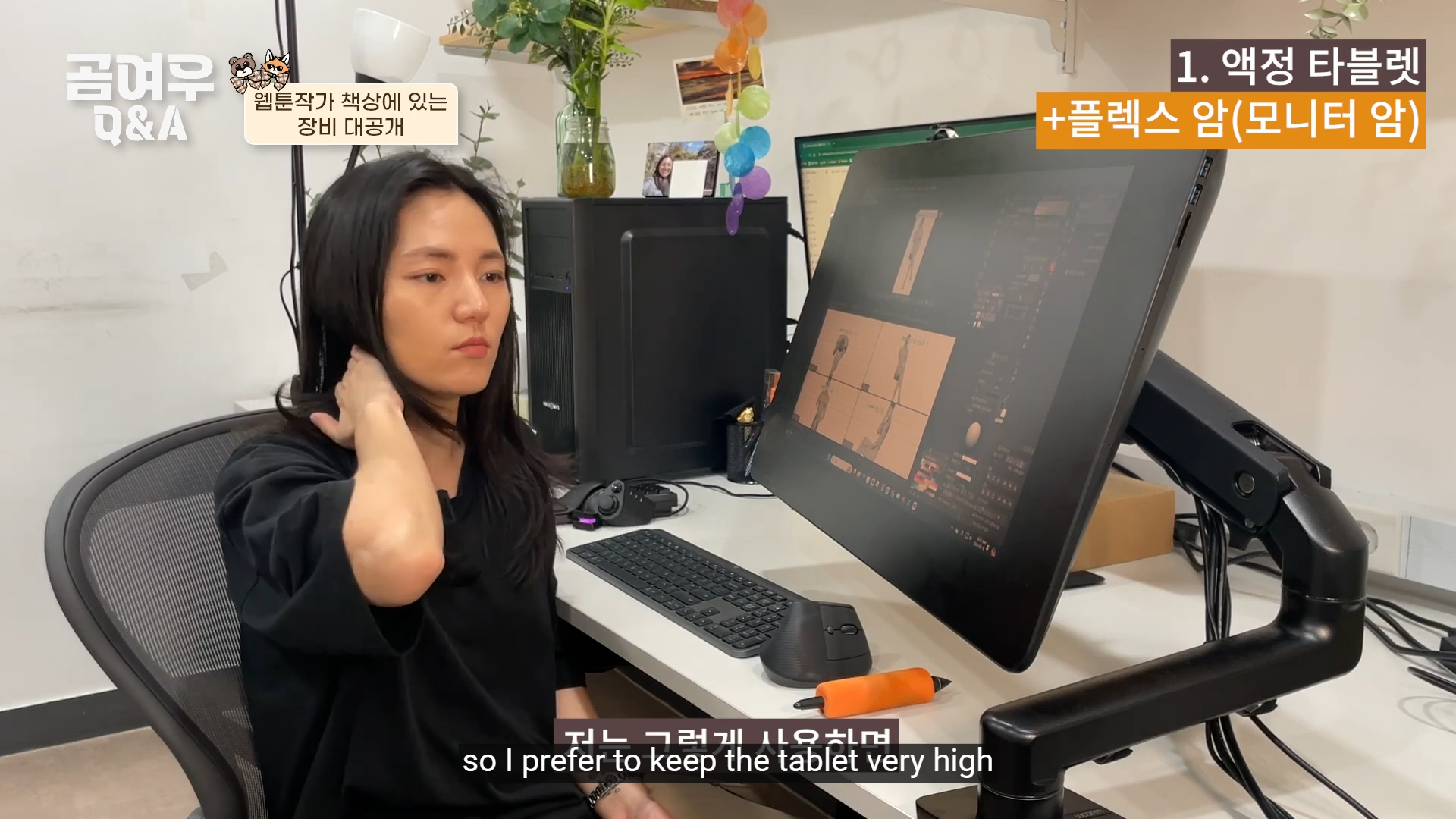
<figure><img src="https://100795559-files.gitbook.io/~/files/v0/b/gitbook-x-prod.appspot.com/o/spaces%2FFTDevk6pVgbzRnLdmWfX%2Fuploads%2FVsdi021QF7J1WY4c7MAc%2FBy_5f_aOQAk%2000-03-21%208-Year%20Webtoon%20Artist%E2%80%99s%20Full%20Gear%20Tour%20%F0%9F%92%BB%E2%8F%B0%F0%9F%92%A1%20%5BQ%26A%20Ep.6%5D%20-%20so%20I%20prefer%20to%20keep%20the%20tablet%20very%20high.png?alt=media&amp;token=a13371e1-bbe7-4611-82d8-11d5cc475608" alt=""><figcaption><p>"While some people use it tilted down, I feel that using it that way quickly strains my neck, so I prefer to keep the tablet very high."<br>Source: <a href="https://youtu.be/By_5f_aOQAk?t=187">https://youtu.be/By_5f_aOQAk?t=187</a></p></figcaption></figure>

<figure><img src="https://100795559-files.gitbook.io/~/files/v0/b/gitbook-x-prod.appspot.com/o/spaces%2FFTDevk6pVgbzRnLdmWfX%2Fuploads%2FAvirs7rUj41GIfqiVu8z%2Fimage.png?alt=media&amp;token=f894b451-afbb-406d-9232-23e625a30aa5" alt=""><figcaption><p>Source: <a href="https://www.instagram.com/p/DYpq6sqkaxN/?img_index=1">https://www.instagram.com/p/DYpq6sqkaxN/</a></p></figcaption></figure>

{% embed url="<https://www.youtube.com/watch?v=MV8ygeLwWT0>" %}
An example of Traditional artists use their drawing board at a high angle.
{% endembed %}

{% embed url="<https://www.youtube.com/watch?v=W01PhKAny_k>" %}
Title: Sitting methods and postures that artists must know if they want to draw for a long time.
{% endembed %}

{% embed url="<https://www.youtube.com/watch?v=DSpyhKA-ReE>" %}